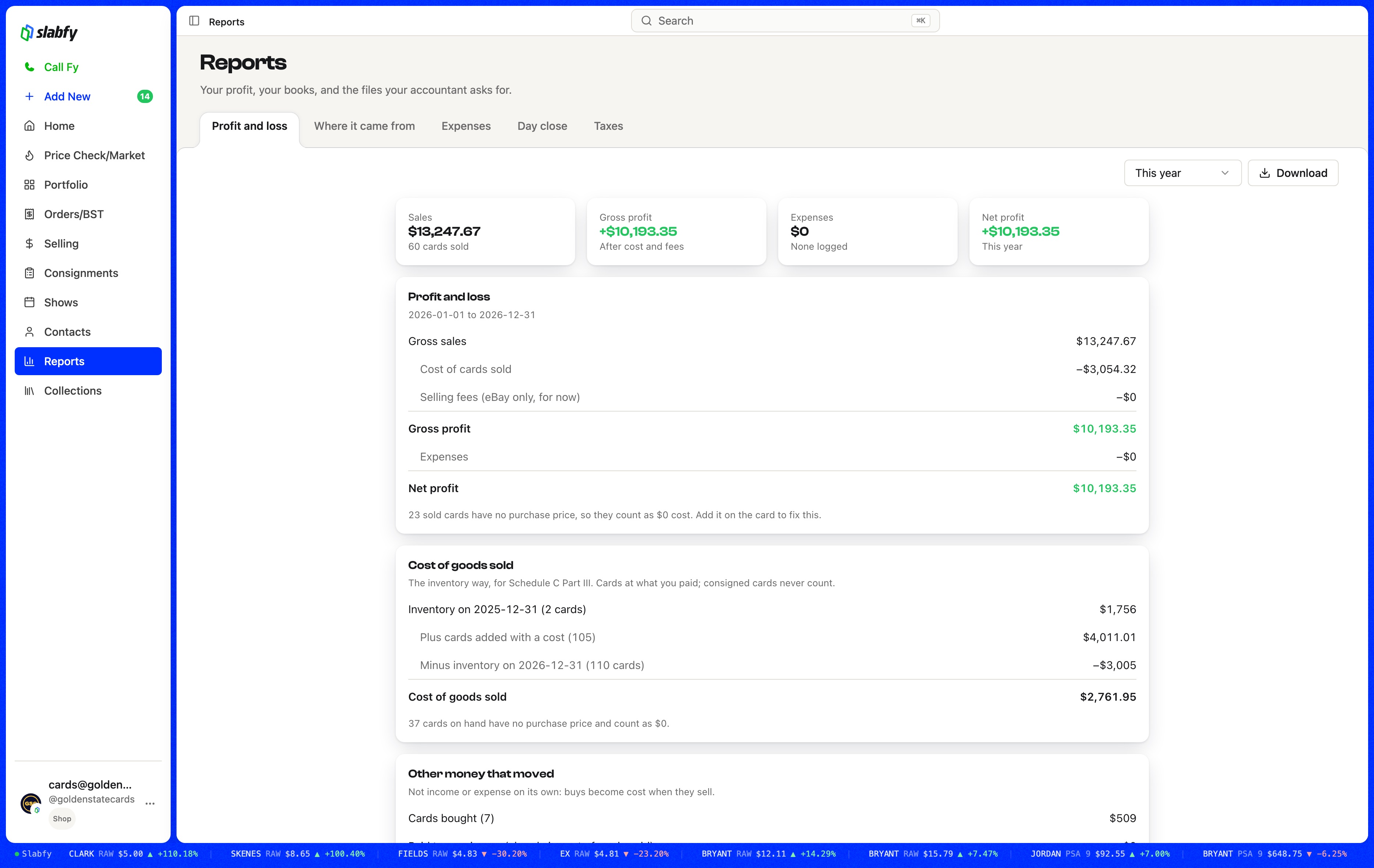
Profit and loss · Dealer
See what you actually made
- Sales, cost of cards sold, selling fees, and net profit
- This month, last quarter, this year, or last year
- Cost of goods sold, laid out for Schedule C
Every sale, buy, and fee you record turns into a P&L. Track expenses, count the drawer, and hand your accountant one file.

Profit and loss · Dealer
Where it came from · Dealer
Expenses · Shop
Day close · Shop
Books & taxes · Shop
Slabfy builds your P&L from what you record: sales, what you paid for the cards you sold, selling fees, and expenses. Pick a month, quarter, or year to see your net profit.
Yes, on Shop. Log expenses by category, like show and table fees, grading, supplies, shipping, and travel. A show's table fee is added for you.
Yes, on Shop. Download an accountant packet as a PDF or spreadsheet, or a file you can upload to QuickBooks.
No. It shows your sales by state and what each payment app reports, so you and your accountant have the numbers. It's a summary of what you recorded, not tax advice.
Profit and loss and the breakdowns come with Dealer. Expenses, day close, taxes, and the downloads are on Shop. See Pricing for details.
14 days free on monthly Collector, Collector Plus, and Dealer.
Start free trial